Professional KG Lock Solution

KG LOCK BYPASS

Factory Reset with Confidence using Samsung Tool

Login
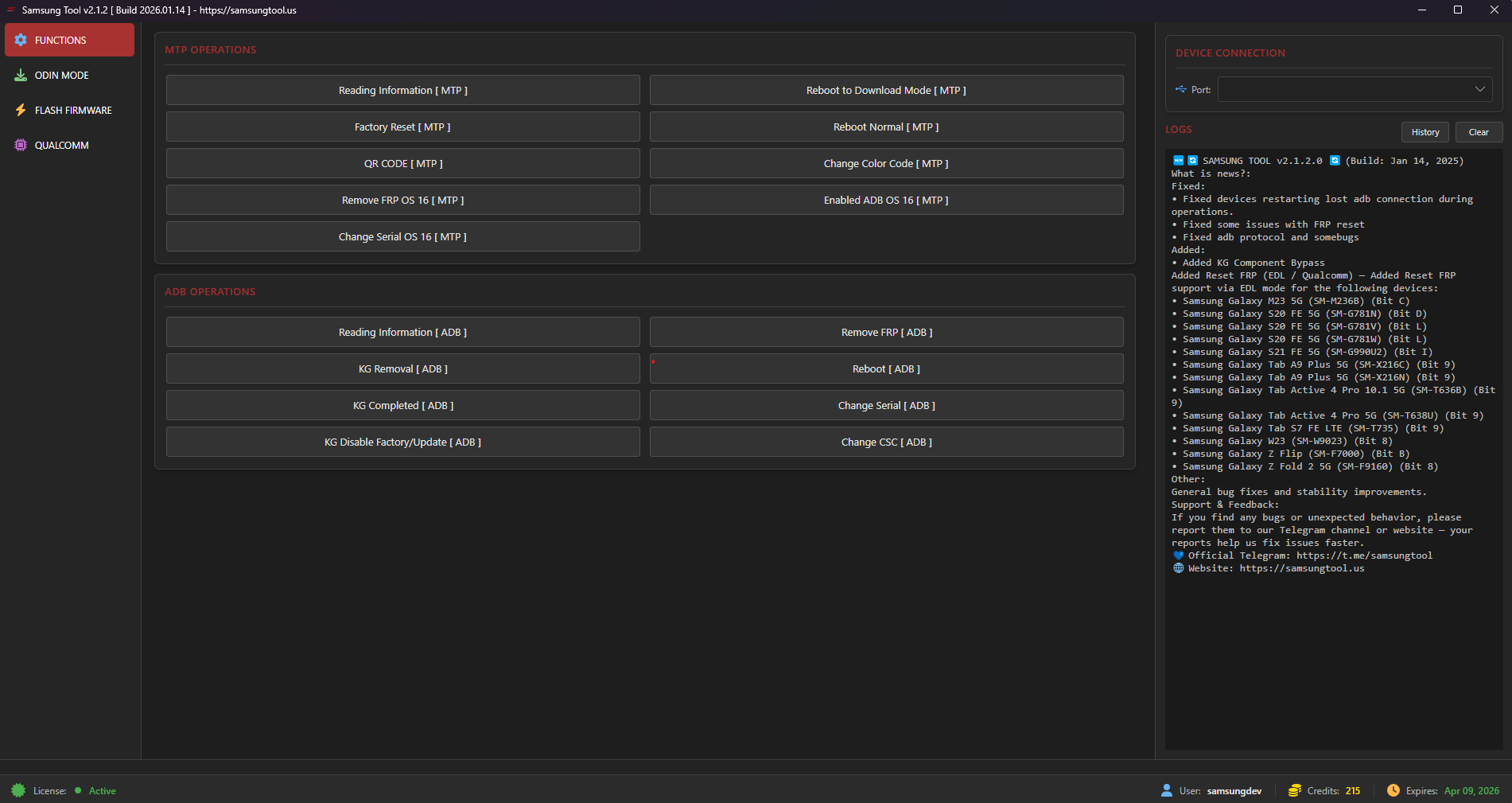
Samsung Tool Screenshot

Key Features

Professional-grade solution with industry-leading stability and performance

STABLE KG LOCK BYPASS

Completely hides all Knox Guard notifications and restrictions, allowing you to use the device like normal.

FACTORY RESET OK

Perform a factory reset with peace of mind. The device will not re-lock, and you remain in full control of your data.

QUICK & EASY OPERATION

Just a few clicks to complete. No deep technical knowledge required—perfect for all users.

SAFE FOR YOUR DEVICE

Software-based solution that does not interfere with your device's hardware or internal system components.

New — Samsung 2026 Updates (Qualcomm) & Improvements

Latest support, patches and protocols added for 2026 Qualcomm-based Samsung models, Knox Guard fixes, Odin direct ZIP and MTP/ADB enhancements.

Support: Samsung 2025 (Qualcomm)

  • Support 300+ Samsung Qualcomm models with latest loaders
  • Flash / Erase / Backup
  • Factory Reset
  • Remove FRP / Remove Lost Mode / Remove "Please Call Me"
  • MDM Can't Download handling
  • Change Serial Number
  • Backup / Erase EFS
  • Read GPT / Read Info

Knox Guard (KG) Removal — Latest Patches

  • KG Removal All FIXED — devices no longer re-lock after KG removal
  • Support PayJoy Lock / Device Control Lock / Offline Lock
  • Patch support: August 2025, September 2025, up to January 2026 (selected devices)

Odin, MTP & ADB Enhancements

  • Odin Flash Protocol — Direct ZIP support without extraction
  • MTP / ADB Operations — Change CSC, Change Serial, and more
  • Patch support: August 2025, September 2025 (for region/carrier and serial patches)

MDM & IT Admin Bypass

  • MDM / IT Admin enrollment bypass (supported models only)
  • Remove IT policy restrictions & device management blocks
  • Fix “Device Managed / Admin Lock” issues after reset
  • Patch support: 2025–2026 (selected devices)

Notes: Patches listed (August 2025, September 2025) apply to specific device subsets — refer to changelog in the app for device-level compatibility. All operations are performed through software processes and maintain device stability when executed as instructed.

🛠️ Step-by-Step Guide

Follow these simple steps to successfully bypass KG Lock

📌 PART 1: Preparation

1

Computer with Samsung USB drivers installed

2

High-quality USB cable for stable connection

3

KG Remove All OS 14 tool ready

4

Phone battery above 50%

⚙️ PART 2: Steps to Follow

1

Access QR Code scanning mode from Hello screen

2

Scan QR code to enable ADB debugging

3

Run bypass tool with USB connection

4

Reboot and perform factory reset

5

Setup device normally

❓ PART 3: Troubleshooting

Problem: Device still shows KG Lock after Factory Reset.

Solution: Don't worry. Just repeat the process from Step 1. Re-running the procedure often fixes the issue.

Download

Click below to download the latest version of the tool:

Download Samsung Tool

Make sure to install Samsung USB drivers before use.

Supported Models

Compatible with a wide range of Samsung devices

Series Model Range Supported OS
Galaxy A Series All Android 10 - 16
Galaxy M Series All Android 10 - 16
Galaxy S Series All Android 10 - 16
Galaxy Z Series All Android 10 - 16
Galaxy Tab Series All Android 10 - 16

📌 Important Notes

This is a Bypass solution; it does not permanently remove the lock from Samsung's servers.

⚠️ To ensure stability: Please do not install OTA software updates after bypassing.

🚫 SECURITY POLICY: Any attempt to use unauthorized software to interfere with, sniff network packets, or copy the tool will be automatically detected. Accounts in violation will be permanently banned without notice.

✅ Ideal For:

Repair shops, technicians, and end users who need to use their device immediately without waiting.

🔥 Contact us now for detailed consultation and pricing! 🔥

FAQ

Common questions about Samsung KG Lock bypass

Is this a permanent KG removal?

No. This is a bypass solution. It does not permanently remove KG from Samsung servers.

Can I factory reset after bypass?

Yes. Factory reset is supported and device should not re-lock (supported devices & patches).

Which Android versions are supported?

Android 10 to Android 16 for supported Samsung models.

🏆 Official Distributors

Trusted partners worldwide

🤝 Authorized Resellers & Technical Partners

Global network of certified partners

Adyunlocker

🔹 Adyunlocker

📞 +1 281 672 8384

💬 Telegram: adyhelpbot

🌐 Website: www.adyunlocker.com/

📍 Dubai, UAE

Legitunlocks

🔹 Legitunlocks

Gsm Africa Official

🔹 Gsm Africa Official

📞 gsmafrica

💬 Telegram: gsmafrica1

🌐 Website: www.gsmafrica.com/

📍 South Africa

GsmGenesis Team

🔹 GsmGenesis Team

📞 +12035167676

💬 Telegram: GsmGenesis

🌐 Website: www.gsmgenesis.com/

FRP King Server

🔹 FRP King Server

Topunlocksite

🔹 Topunlocksite

Activeunlocker

🔹 Activeunlocker

BeeUnlock

🔹 BeeUnlock

📞 +84907685453

💬 Telegram: BeeUnlock

🌐 Website: beeunlock.com

GsmEasy

🔹 GsmEasy

📞 +8613926070786

💬 Telegram: gsmeasy

🌐 Website: imei.us

Fastunlocker

🔹 Fastunlocker

📞 +91 93561 23456

💬 Telegram: FastUnlockers

🌐 Website: fastunlockers.us

📍 India

Appleunlockers

🔹 Appleunlockers

📞 +8801757574757

💬 Telegram: +8801757574757

🌐 Website: appleunlockers.com/

📍 Bangladesh, Philippines , Worldwide

Resellerunlocker

🔹 Resellerunlocker

GSMUnlockInfo

🔹 GSMUnlockInfo

📞 gsmunlockinfo

💬 Telegram: GSMUnlockInfo

🌐 Website: gsmunlockinfo.com/

✉️ [email protected]

📍 South Africa / Pakistan

JawaazUnlocker

🔹 JawaazUnlocker

Leope-GSM

🔹 Leope-GSM

📞 +584124056413

💬 Telegram: GaelaGsm

🌐 Website: leope-gsm.com/

Martlobs GSM

🔹 Martlobs GSM

📞 +50765646009

💬 Telegram: MARTLOBSGSM

🌐 Website: martlobsgsm.com/

TerritorioUnlock

🔹 TerritorioUnlock

📞 +524423770610

💬 Telegram: TerritorioUnlock

🌐 Website: territorioremoto.com/

📍 México - Worldwide

UNLOCK  EASY

🔹 UNLOCK EASY

📞 +8801713-323205

💬 Telegram: unlockeasy

🌐 Website: www.unlockeasy.us/

📍 Bangladesh - Worldwide

DM Unlocker

🔹 DM Unlocker

📞 +8801747113074

💬 Telegram: dmunlockerserver

🌐 Website: dmunlocker.com/

✉️ [email protected]

📍 Brazil & Worldwide, Bangladesh

PuntoDigitalServer

🔹 PuntoDigitalServer

📞 573184435189

💬 Telegram: puntodigitalbuga

🌐 Website: www.puntodigitalserver.com/

📍 Colombia - WorldWide

eSimUNlocker

🔹 eSimUNlocker

📞 +16704836795

💬 Telegram: eSimUnlockersupport

🌐 Website: esimunlocker.com/

📍 Reseller Worldwide

GsmNinja

🔹 GsmNinja

📞 +919315532726

💬 Telegram: gsmninja

🌐 Website: www.gsmninja.com/

✉️ [email protected]

📍 India - Reseller Worldwide

Imran Vip Unlocking

🔹 Imran Vip Unlocking

📞 +923364155557

💬 Telegram: Imranvipunlockingdotcom

🌐 Website: imranvipunlocking.com/

✉️ [email protected]

📍 Pakistan and Worldwide

Ohidera Unlocker

🔹 Ohidera Unlocker

📞 +8801660122234

💬 Telegram: ohideraunlockerofficialchannel

🌐 Website: ohideraunlocker.com/

✉️ [email protected]

📍 Bangladeshf , UAE, Brazil & Worldwide

Gsm Pak Official

🔹 Gsm Pak Official

📞 27720386432

💬 Telegram: gsmpak

🌐 Website: www.gsmpak.com/

📍 Worldwide , Pakistan , Africa Countries

GSM-T-TOOL

🔹 GSM-T-TOOL

📞 +9647708689458

💬 Telegram: GsmTtoolSupport_bot

🌐 Website: gsm-t-tool.com/

📍 WorldWide Reseller

CleanUnlockerTeam

🔹 CleanUnlockerTeam

📞 +96890225071

💬 Telegram: cleanunlockerteam

🌐 Website: cleanunlocker.com/

✉️ [email protected]

📍 WORLDWIDE/BANGLADESH /OMAN/BRAZIL/MEXICO

🔹 Technical Partner Program

Are you a technician interested in distributing or supporting our tool?
👉 Contact us now to become a partner!